> ## Documentation Index
> Fetch the complete documentation index at: https://lancedb-bcbb4faf-update-indexing-docs.mintlify.site/llms.txt
> Use this file to discover all available pages before exploring further.
# Quantization
> Use quantization to improve storage requirements and query latency of your LanceDB vector index.
Quantization compresses high-dimensional vectors into concise representations that admit efficient storage with only a small compromise in search accuracy.
Quantization is beneficial when your dataset uses high-dimensional vectors ($512, 768, 1024$ or more dimensions), or when index build time and query latency are crucial.
LanceDB currently exposes several quantized vector index types, with a range of options differing in indexing technique (`IVF_*`,`IVF_HNSW_*`) and method of quantization (`PQ`,`RQ`,`SQ`).
* `IVF_PQ` -- Inverted File index with Product Quantization (default). See the [vector indexing guide](/indexing/vector-index) for `IVF_PQ` examples.
* `IVF_SQ` -- Inverted File index with Scalar Quantization. This is available in Python and Rust; TypeScript does not currently expose `IvfSq`.
* `IVF_RQ` -- Inverted File index with **RaBitQ** quantization (binary, 1 bit per dimension). Requires vector dimensions divisible by `8`. See [below](#rabitq-quantization) for details.
* `IVF_HNSW_SQ` -- IVF partitions with an **HNSW graph per partition** plus **Scalar Quantization**. Strong recall/latency/size trade-off for most workloads.
* `IVF_HNSW_PQ` -- IVF partitions with an **HNSW graph per partition** plus **Product Quantization**. Prefer when PQ-level compression matters and you still want HNSW-style in-partition search.
Different indexing and quantization techniques may be better suited for certain use cases. For example, `IVF_PQ` works well in many cases, but RaBitQ (`IVF_RQ`) allows for more aggressive compression.
See the ["Choose the Right Index"](/indexing/vector-index#choose-the-right-index) table for further discussion.
todo decide what to do here vv
Use the same distance metric when training and querying the index. For IVF-based indexes, `num_partitions` controls the number of groups and `sample_rate` controls how many training vectors are sampled per partition, so the training sample is roughly `sample_rate * num_partitions`.
## Quantization Techniques
### Product Quantization
Quantization is a compression technique used to speed up search by reducing the dimensionality of an embedding.
Product quantization (PQ) first projects each large, high-dimensional vector into equal-sized subvectors. Each subvector is assigned a "reproduction value" that maps to the nearest centroid of points for that subvector.
The reproduction values are then assigned to a codebook using unique IDs, which can be used to reconstruct the original vector.
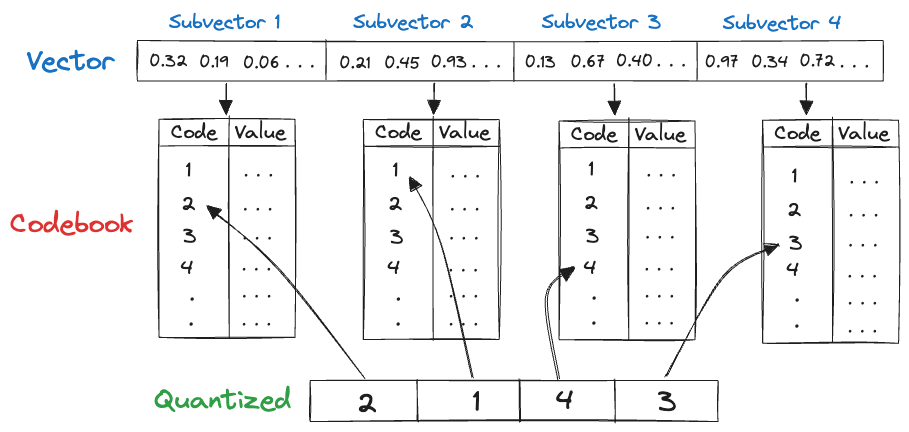 As an example, consider the above image, which visualizes quantizing a 128-dimensional vector of 32-bit integers into a 4-dimensional vector of 8-bit integers.
Original storage: `128 × 32 = 4096` bits.
Quantized storage: `4 × 8 = 32` bits.
In this example, quantization achieves a **128x** reduction in the memory requirement of each indexed vector.
It's important to remember that quantization is a *lossy process*, i.e., that no operation on the reconstructed vector can exactly recover the original vector.
### RaBitQ quantization
RaBitQ is a binary quantization method that represents each normalized embedding using **1 bit per dimension**, plus a couple of small corrective scalars. In practice, a 1,024-dimensional `float32` vector that would normally take 4 KB can be compressed to roughly a few hundred bytes with RaBitQ, while still maintaining reasonable recall.
#### How RaBitQ works
* Embeddings are grouped around centroids (as in other IVF indexes).
* Each residual vector is normalized and mapped to the nearest vertex of a randomly rotated hypercube on the unit sphere.
* The sign pattern of that vector is stored as bits (1 bit per dimension).
* Two small corrective factors are stored:
1. The distance from the original vector to its centroid
2. The dot product between the normalized vector and its quantized version
Compared to `IVF_PQ`, RaBitQ:
* Avoids training expensive PQ codebooks
* Builds indexes faster and handles updates more easily
* Maintains or improves recall at high dimensionality under the same storage budget
For a deeper dive into the theory and some benchmark results, see the blog post: [LanceDB's RaBitQ Quantization for Blazing Fast Vector Search](https://lancedb.com/blog/feature-rabitq-quantization/).
#### Using RaBitQ
You can create an RaBitQ-backed vector index by setting `index_type="IVF_RQ"` when calling `create_index`.
When using `IVF_RQ`, the dimension of vectors must be a multiple of `8`.
`num_bits` controls how many bits per dimension are used:
1 bit is the classic RaBitQ setting. You can set it to 2, 4, or 8 bits to improve fidelity for better precision or recall — the main trade-off is additional storage for the extra bits per dimension, with only a modest increase in query-time compute.
It's also possible to tune the number of IVF partitions in `IVF_RQ`, similar to how you would do in `IVF_PQ`.
Indexes built with `num_bits >= 2` use an updated on-disk layout. Older LanceDB versions cannot read them and will fail with a clear missing-column error rather than returning incorrect results. Existing indexes keep working and upgrade automatically when they are rewritten (for example, during compaction, optimize, or remap). `num_bits=1` indexes are unaffected in both directions.
### SQ (todo?)
## API Reference
The full list of parameters to the algorithm are listed below.
* `distance_type`: Literal\["l2", "cosine", "dot"], defaults to "l2"\
The distance metric used in comparison.
* `num_partitions`: Optional\[int], defaults to None\
Number of IVF partitions (affects index build time and query accuracy). More partitions can improve recall but may increase build time. When unset, LanceDB chooses roughly the square root of the row count.
* `num_bits`: int, defaults to 1\
Bits per dimension for quantization (1 is standard RaBitQ). Higher values improve fidelity, mainly at the cost of additional storage.
* `max_iterations`: int, defaults to 50\
Maximum number of iterations for training the quantizer. Increase for larger datasets or to improve quantization quality.
* `sample_rate`: int, defaults to 256\
Number of samples per partition during training. Higher values may improve accuracy but increase training time.
* `target_partition_size`: Optional\[int], defaults to None\
Target number of vectors per partition. Adjust to control partition granularity and memory usage. If `num_partitions` is also set, `num_partitions` takes precedence.
As an example, consider the above image, which visualizes quantizing a 128-dimensional vector of 32-bit integers into a 4-dimensional vector of 8-bit integers.
Original storage: `128 × 32 = 4096` bits.
Quantized storage: `4 × 8 = 32` bits.
In this example, quantization achieves a **128x** reduction in the memory requirement of each indexed vector.
It's important to remember that quantization is a *lossy process*, i.e., that no operation on the reconstructed vector can exactly recover the original vector.
### RaBitQ quantization
RaBitQ is a binary quantization method that represents each normalized embedding using **1 bit per dimension**, plus a couple of small corrective scalars. In practice, a 1,024-dimensional `float32` vector that would normally take 4 KB can be compressed to roughly a few hundred bytes with RaBitQ, while still maintaining reasonable recall.
#### How RaBitQ works
* Embeddings are grouped around centroids (as in other IVF indexes).
* Each residual vector is normalized and mapped to the nearest vertex of a randomly rotated hypercube on the unit sphere.
* The sign pattern of that vector is stored as bits (1 bit per dimension).
* Two small corrective factors are stored:
1. The distance from the original vector to its centroid
2. The dot product between the normalized vector and its quantized version
Compared to `IVF_PQ`, RaBitQ:
* Avoids training expensive PQ codebooks
* Builds indexes faster and handles updates more easily
* Maintains or improves recall at high dimensionality under the same storage budget
For a deeper dive into the theory and some benchmark results, see the blog post: [LanceDB's RaBitQ Quantization for Blazing Fast Vector Search](https://lancedb.com/blog/feature-rabitq-quantization/).
#### Using RaBitQ
You can create an RaBitQ-backed vector index by setting `index_type="IVF_RQ"` when calling `create_index`.
When using `IVF_RQ`, the dimension of vectors must be a multiple of `8`.
`num_bits` controls how many bits per dimension are used:
1 bit is the classic RaBitQ setting. You can set it to 2, 4, or 8 bits to improve fidelity for better precision or recall — the main trade-off is additional storage for the extra bits per dimension, with only a modest increase in query-time compute.
It's also possible to tune the number of IVF partitions in `IVF_RQ`, similar to how you would do in `IVF_PQ`.
Indexes built with `num_bits >= 2` use an updated on-disk layout. Older LanceDB versions cannot read them and will fail with a clear missing-column error rather than returning incorrect results. Existing indexes keep working and upgrade automatically when they are rewritten (for example, during compaction, optimize, or remap). `num_bits=1` indexes are unaffected in both directions.
### SQ (todo?)
## API Reference
The full list of parameters to the algorithm are listed below.
* `distance_type`: Literal\["l2", "cosine", "dot"], defaults to "l2"\
The distance metric used in comparison.
* `num_partitions`: Optional\[int], defaults to None\
Number of IVF partitions (affects index build time and query accuracy). More partitions can improve recall but may increase build time. When unset, LanceDB chooses roughly the square root of the row count.
* `num_bits`: int, defaults to 1\
Bits per dimension for quantization (1 is standard RaBitQ). Higher values improve fidelity, mainly at the cost of additional storage.
* `max_iterations`: int, defaults to 50\
Maximum number of iterations for training the quantizer. Increase for larger datasets or to improve quantization quality.
* `sample_rate`: int, defaults to 256\
Number of samples per partition during training. Higher values may improve accuracy but increase training time.
* `target_partition_size`: Optional\[int], defaults to None\
Target number of vectors per partition. Adjust to control partition granularity and memory usage. If `num_partitions` is also set, `num_partitions` takes precedence.